As you’ve probably heard, Episerver is creating a Headless CMS API called “Content Delivery API“.
With this, you can get, list and search (requires Episerver Find) content from Episerver in a JSON format.
Matthew Mols has some blog posts about how to get started: Getting started with the Episerver Content Delivery API and Add HTTP Caching to the Episerver Content Delivery API.
I just started looking at it myself and found some basic ways how to tweak the output of the API when it comes to Content and Properties.
Basics
A simplified description of what you get from the API is a JSON serialized ContentApiModel. ContentApiModel is basically a copy of the Content populated depending on what content interfaces your content implements.
The model returned is
- If the content implements ILocale, set the Language property
- If the content implements ILocalizable, set the MasterLanguage and ExistingLanguage properties
- If the content implements IVersionable, set the properties StartPublish, StopPublish as well as Status
- If the content implements ICategorizable, add a CategoryPropertyModel to the ContentApiModel.Properties property
Also, for each PropertyData in your Content.Property try to find a registered IPropertyModelHandler that has an TypeModel that can handle the Property Type.
TypeModel you say?
The TypeModel contains three things:
| Type |
Name |
Description |
| Type |
PropertyType |
Which Property Type this TypeModel can support. For example PropertyContentReference, PropertyXhtmlString etc. |
| Type |
ModelType |
The type of the class that takes care of the rendering. Needs to implement the Interface IPropertyModel. |
| string |
ModelTypeString |
The name of the PropertyModel, normally the same name as the name of the ModelType. |
PropertyModel
This is a ContentDelivery version of the PropertyData. This is what is rendered as a JSON for each Property on your Content.
For example the PropertyNumber would be represented by NumberPropertyModel. The NumberPropertyModel has a Value (the numeric value of your property) and a PropertyDataType which usually is the name of the value type (in this case “PropertyNumber”).
How do I add Custom Properties or replace the JSON output?
Adding for new Properties
For example if I’d be using ImageVault including their custom Property Types, the property won’t be displayed as no IPropertyModelHandler that can handle PropertyMedia.
Instead of creating your own implementation of IPropertyModelHandler, you can just add more TypeModels to the existing one in an InitializationModule.
So let’s add a ModelType for PropertyMedia in the InitializationModule. Mimicking how Episerver handles their common Property types, the JSON output will look like this:
"Image": {
    "Value": {
        "Id": 33114,
        "Effects": [],
        "IsReadOnly": true,
        "IsModified": false
    },
    "PropertyDataType": "PropertyMedia"
}
Which isn’t really helpful since ImageVault images are not served as content so we can’t use that ID with the ContentDeliveryApi. We need to add a little extra information so let’s create a new PropertyModel that will wrap the MediaReference, but also add a Url to the image.
Replacing for existing Properties
This is the same procedure but instead of creating a new TypeModel, just replace the value of the ModelType property with an own Type in the InitializationModule.
Check an example of InitializationModule to add or replace properties.
The toolbox for PropertyModels
There are some nice base classes that you can play with. The key Interface you need to work with is the IPropertyModel:
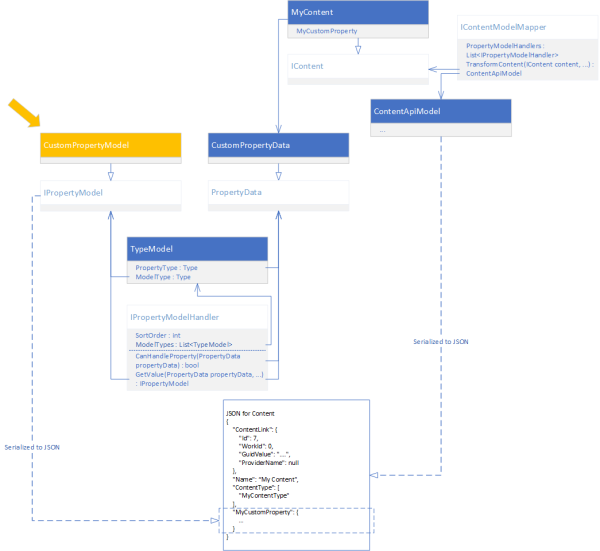
IPropertyModel
This is the most basic Interface that you need to implement according to the default PropertyModelHandler. It only contains two properties:
| Type |
Name |
Description |
| string |
Name |
The name of the Property Model, usually the name of the Episerver Property type. |
| string |
PropertyDataType |
The name of the Property Model, usually the name of the Episerver Property type. |
What I can see when reflecting Episerver’s code, it seems like your implementation also need a constructor with a parameter with the PropertyData.
public class MyPropertyModel : IPropertyModel
{
    public MyPropertyModel(MyPropertyData property)
    {
        // Do something to the property, and add the output to Properties for serialization
    }

    public string Name { get; set; }
    public string PropertyDataType { get; set; }
}
For your convenience, Episerver have a base class for this: EPiServer.ContentApi.Core.PropertyModel where TValue is the value you should output in your JSON, and TType is the PropertyData. Check some examples where I’m serializing the Property value or even serializing with extra information.
As the PropertyModel is serialized to a JSON, all properties on your implementation will be included in the result (except if you decorate the property with the JsonIgnore attribute – see below).
IPersonalizableProperty
If the output of your Custom Property depends on personalization, implement the IPersonizableProperty. The interface only requires a Property called ExcludePersonalizedContent, but it seems like your implementation need a constructor with the PropertyData AND a boolean.
public class MyPersonalizedPropertyModel : IPropertyModel, IPersonizableProperty
{
    public MyPersonalizedPropertyModel(MyPropertyData property, bool excludePersonalizedContent)
    {
        if (excludePersonalizedContent)
        {
            // add logic to exclude personalized content
        }
    }

    public string Name { get; set; }
    public string PropertyDataType { get; set; }
    public bool ExcludePersonalizedContent { get; set; }
}
For your convenience, Episerver also have a base class for this: EPiServer.ContentApi.Core.PersonalizablePropertyModel where TValue is the value you should output in your JSON, and TType is the PropertyData.
IExpandableProperty
IExpandabeProperty is used for properties that where you can return a simplified set of data for the initial API Request, so that the Client can make further requests to dig deeper into the data.
ContentAreas and ContentReferences are two examples for this. The first response for a ContentArea would look like this:
"MyContentArea": {
    "Value": [
        {
            "ContentLink": {
                "Id": 9,
                "WorkId": 0,
                "GuidValue": "5f3d81e6-28f8-4f16-b998-87378fc9c4d6",
                "ProviderName": null
            },
            "DisplayOption": "",
            "Tag": null
        }
    ],
    "PropertyDataType": "PropertyContentArea"
}
But if it would be expanded by having the parameter ?expand=Steps or ?expand=*, the JSON output for the ContentArea would look like this:
"MyContentArea": {
    "ExpandedValue": [ // When expanding, expanded information goes here
        {
            "ContentLink": {
                "Id": 9,
                "WorkId": 0,
                "GuidValue": "5f3d81e6-28f8-4f16-b998-87378fc9c4d6",
                "ProviderName": null
            },
            "Name": "My Block",
            "Language": {
                "DisplayName": "English",
                "Name": "en"
            },
            "ExistingLanguages": [
                {
                    "DisplayName": "English",
                    "Name": "en"
                }
            ],
            "MasterLanguage": {
                "DisplayName": "English",
                "Name": "en"
            },
            "ContentType": [
                "Block",
                "MyBlock"
            ],
            "ParentLink": {
                "Id": 8,
                "WorkId": 0,
                "GuidValue": "87a9ae8a-a2a8-40e5-8c09-5c5c55a73e17",
                "ProviderName": null
            },
            "RouteSegment": null,
            "Url": null,
            "Changed": "2018-04-09T16:05:01Z",
            "Created": "2018-04-09T16:05:01Z",
            "StartPublish": "2018-04-09T16:05:01Z",
            "StopPublish": null,
            "Saved": "2018-04-09T16:05:34Z",
            "Status": "Published",
            "Category": {
                "Value": [],
                "PropertyDataType": "PropertyCategory"
            },
            // Other properties goes here
        }
    ],
    "Value": [ // Here goes the original value before expanding
        {
            "ContentLink": {
                "Id": 9,
                "WorkId": 0,
                "GuidValue": "5f3d81e6-28f8-4f16-b998-87378fc9c4d6",
                "ProviderName": null
            },
            "DisplayOption": "",
            "Tag": null
        }
    ],
    "PropertyDataType": "PropertyContentArea"
}
Note that expanding will only dig through the first level of nested Content.

[JsonIgnore]
If you have Properties on your ModelType that you don’t want to be included in the JSON output, just decorate it with the JsonIgnore Attribute.
Summary
I hope you learned something new about Episerver’s Content Delivery API. It’s still kind of new and the documentation is not very good yet.
If you have any tips and tricks, feel free to blog about it and give me a shout! Always nice learning something new!












 Alf Nilsson talks